NewMCP server for AI agents is here

The fastest way to read CloudWatch logs.

easywatch is a native Mac app to search, live tail and investigate your logs. It runs on your machine, only reads data, and tells you what a query costs before you run it.

  • Free forever plan
  • 14-day trial, no card required
  • macOS on Apple Silicon
easywatch — production · us-east-1
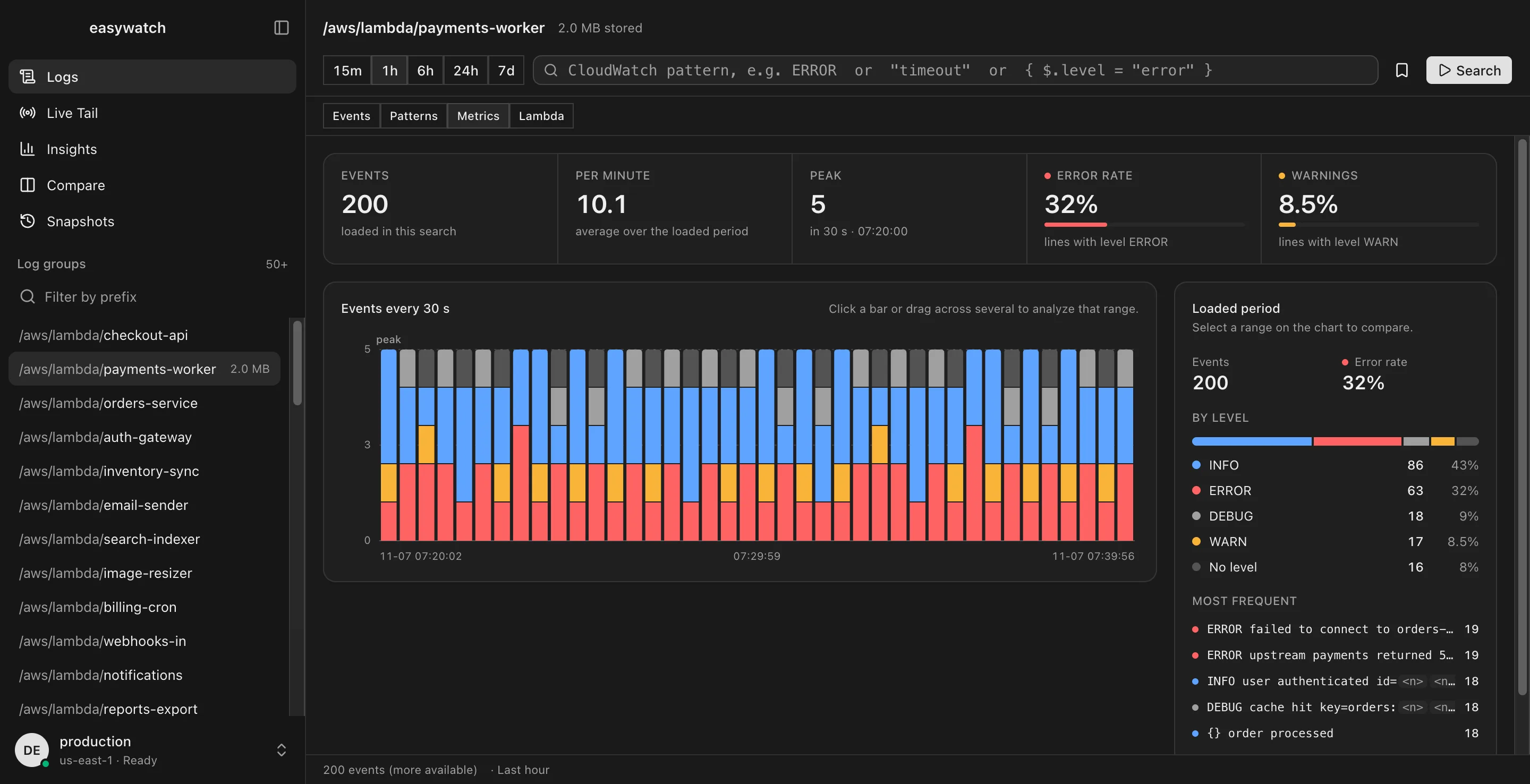
easywatch Metrics view: error rate, warnings and a per-level histogram for a Lambda log group

Works with the credentials you already use

  • AWS CLI profiles
  • IAM Identity Center
  • Leapp
  • credential_process

Why easywatch

The console is built to configure AWS. easywatch is built to read it.

Three ideas shape every screen in the app.

FIG 0.4

Every log,
one window.

Log groups, search, patterns and cost live in one native window. Pick a group, filter, and the error you need is already highlighted.

Take the tour
QUERY BARCOST ESTIMATELOG GROUPSSELECTED ERROREVENT TABLE

Features

Built for the 2 a.m. incident

Everything you do in the CloudWatch console, plus what it can't: AI that reads logs with you, patterns, cost guards and requests traced across services.

FIG 1.0 · AI & agents

Built for AI agents

easywatch AI explains an error, writes the Insights query and summarizes the incident. With the built-in MCP server, agents like Claude Code and Cursor investigate your logs on their own, read-only and within your spend cap.

  • MCP server
  • Explain errors
  • Plain-English queries
  • Incident summaries
  • Bring your own key
claude · mcp: easywatch
  1. › why is checkout failing since 21:40?

  2. ⏺ easywatch.search_logsgroup /aws/lambda/checkout-api · ERROR · last 1h

  3. ⏺ easywatch.find_patterns19× upstream payments returned 502 · since 21:46

  4. ⏺ easywatch.follow_requestcheckout-api → payments-worker · timeout after 6.0s

  5. ● payments-worker times out calling the payments API, so checkout returns 502. Started 21:46. Query cost so far: $0.002.
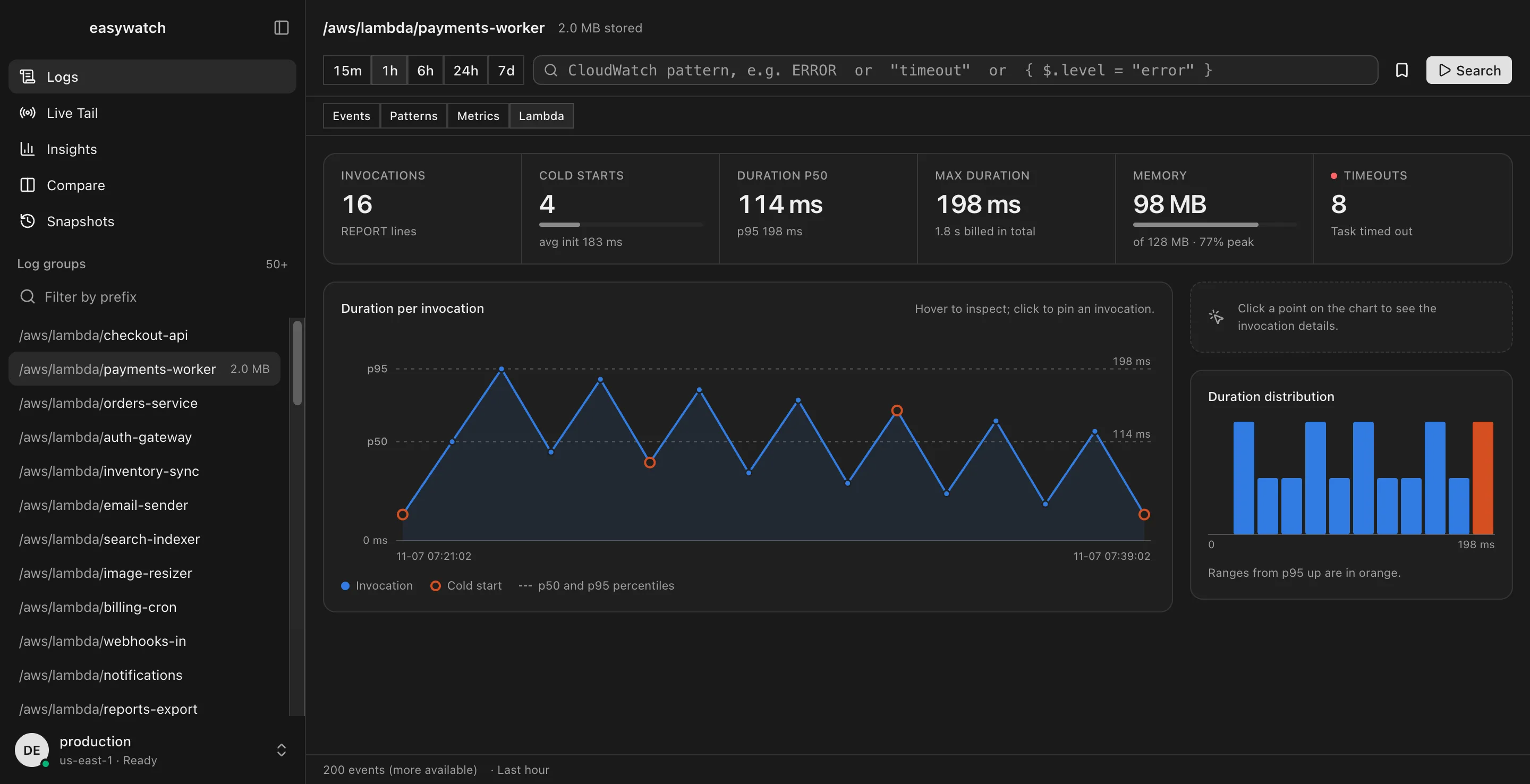
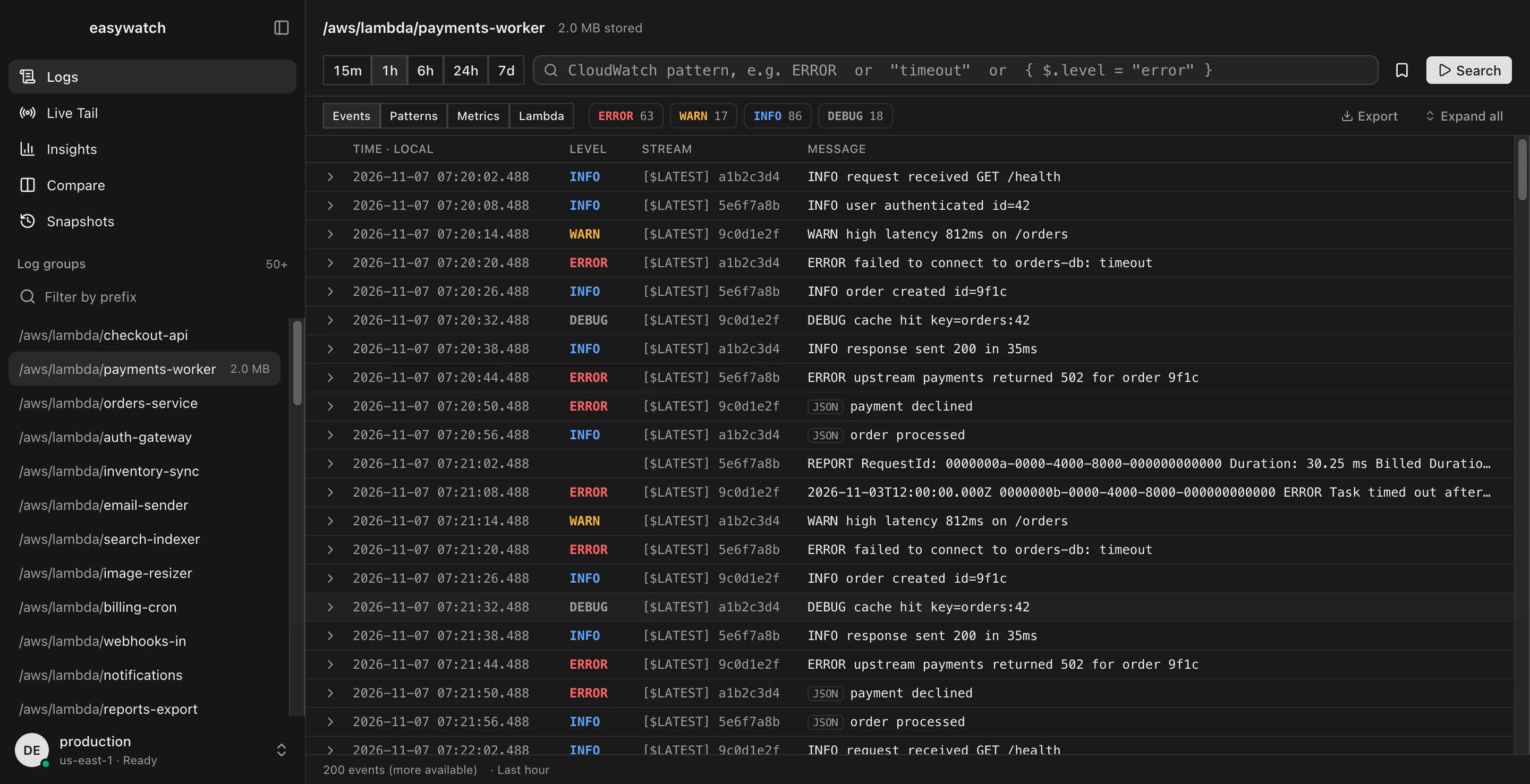
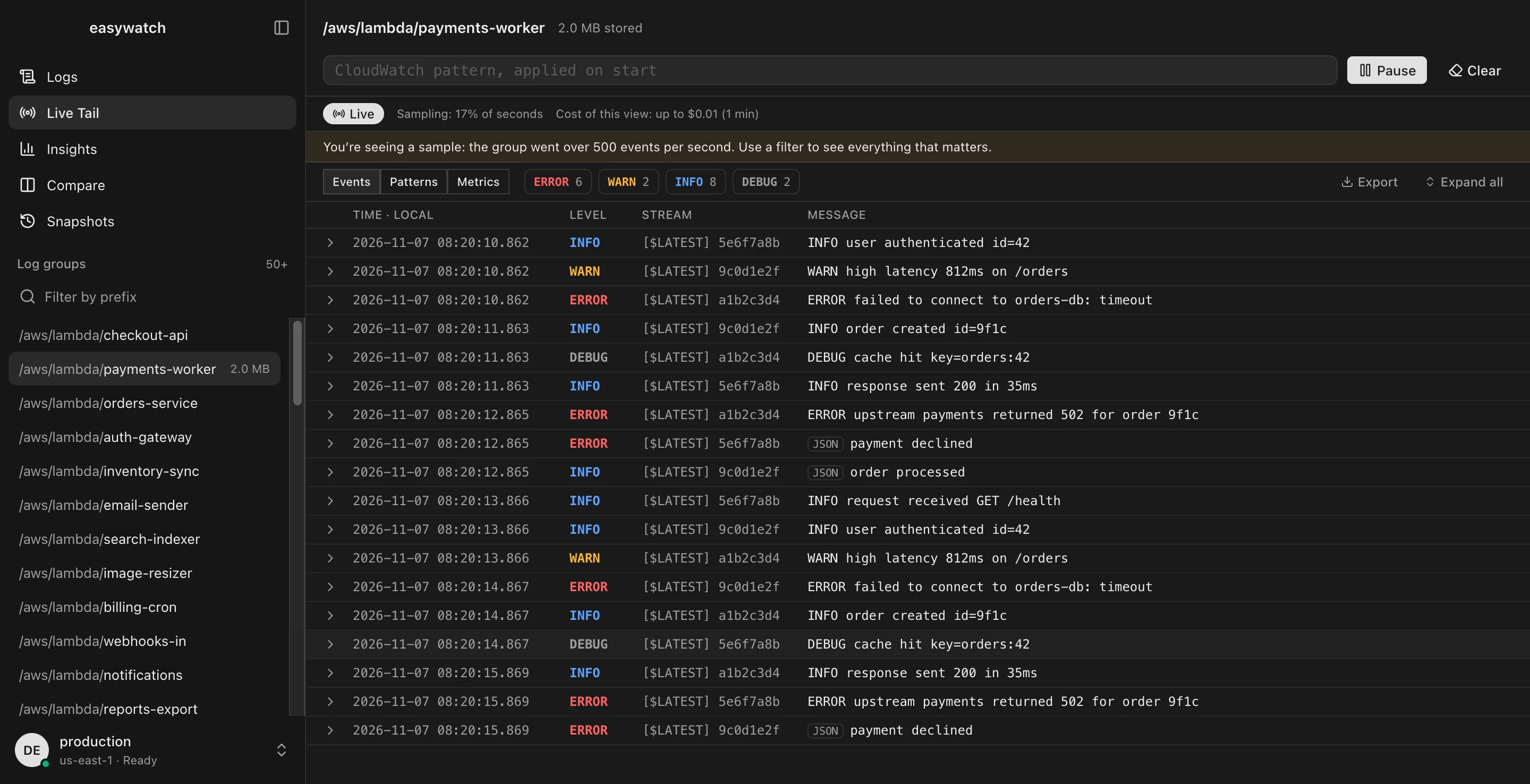
FIG 1.1 · Live Tail

Watch it happen, not the bill

Events stream in real time. The session pauses itself when the window loses focus, so you never pay for minutes nobody is watching.

LiveCost of this view: up to $0.01 (1 min)

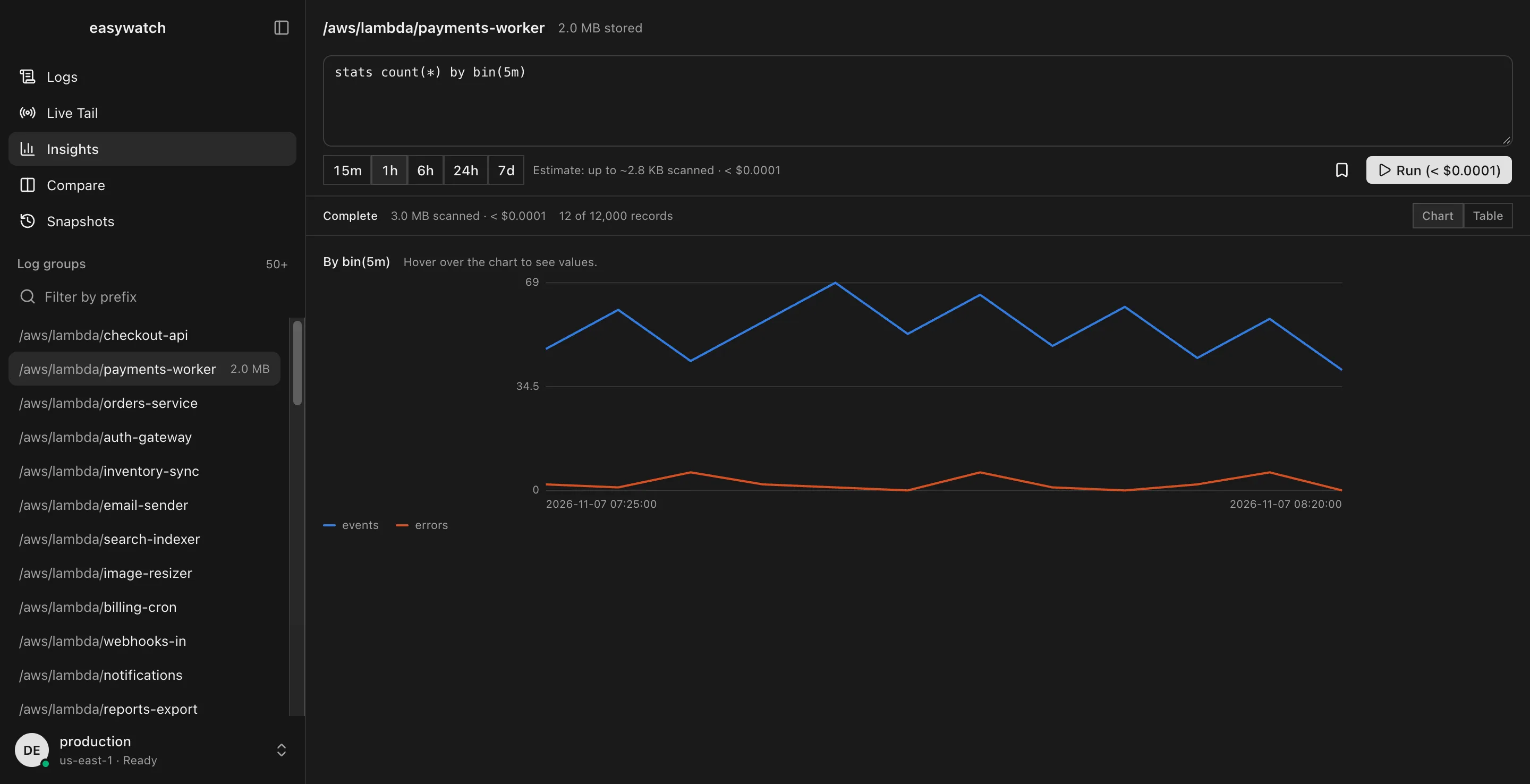
    FIG 1.2 · Logs Insights

    Know the cost first

    Every query shows what it will scan before you run it.

    filter level = "ERROR"

    | stats count(*) by bin(5m)

    ~2.8 KB scanned · < $0.0001Run

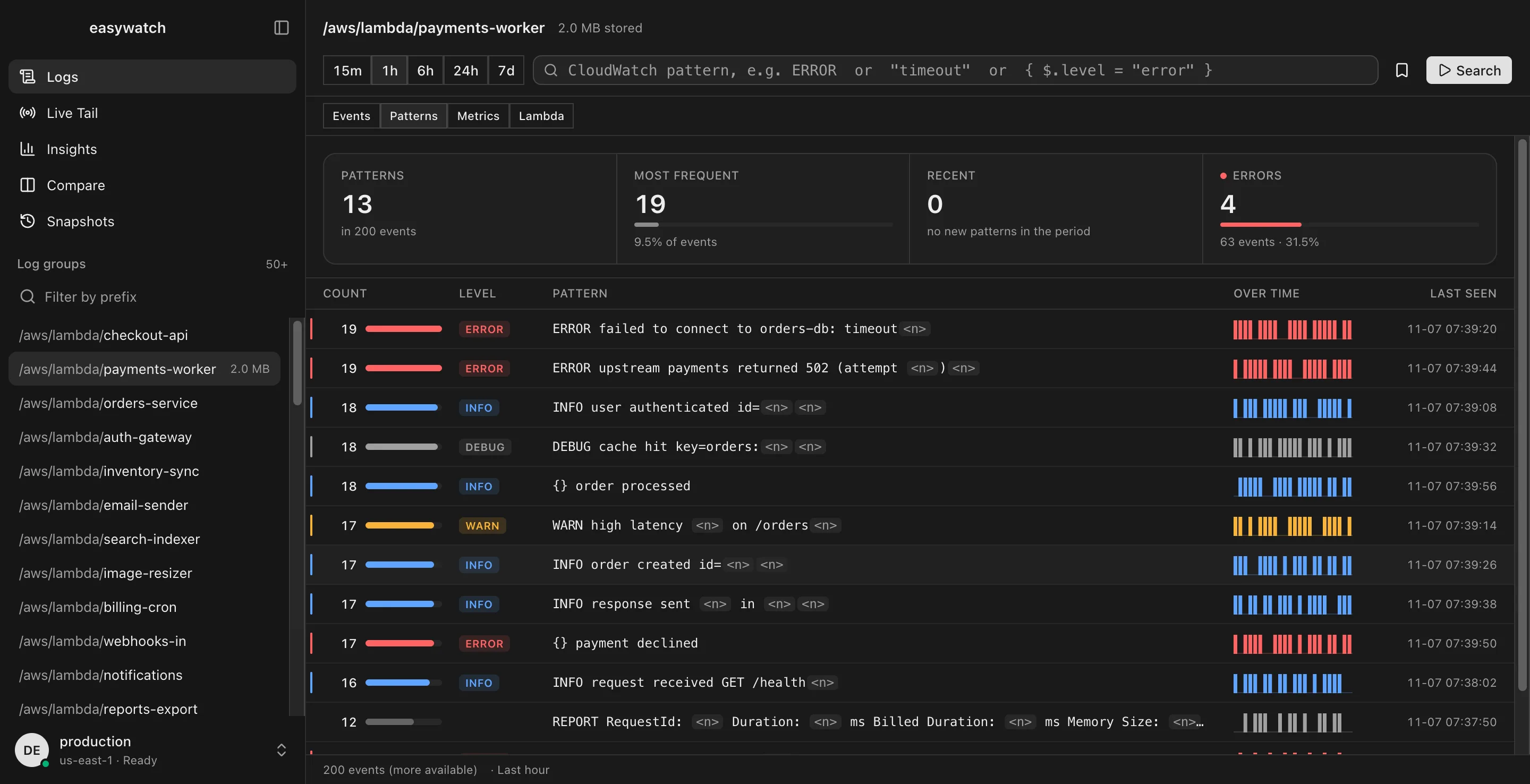
    FIG 1.3 · Patterns

    Noise becomes a short list

    Thousands of similar lines collapse into patterns with counts.

    • 19ERRORfailed to connect to orders-db: timeout
    • 19ERRORupstream payments returned 502
    • 17WARNhigh latency <n>ms on /orders
    • 18INFOuser authenticated id=<n>

    FIG 1.4 · Spend cap

    A ceiling on every surprise

    Set a daily or monthly limit. The app asks before a query crosses it, and Live Tail pauses at the cap.

    Today$3.40 / $5.00

    Next query would exceed the cap. Confirm to continue.

    FIG 1.5 · Lambda

    Cold starts, memory and timeouts at a glance

    Built straight from REPORT lines. Click a point to pin the invocation.

    Lambda panel with invocations, cold starts, duration and memory

    FIG 1.6 · Tracing

    Follow one request

    Search the same Request ID or X-Ray trace across up to 10 groups.

    req 8f3c…a916.2 s
    1. api-gateway200
    2. checkout-api502
    3. orders-db12ms
    4. payments-workertimeout
    5. cachehit
    0 s3 s6 s

    FIG 1.7 · Compare

    What changed since yesterday?

    Run the same search in up to 3 accounts side by side, or against the previous period, and see which patterns appeared, disappeared or spiked.

    prod · now

    • + newERROR upstream payments returned 502
    • ▲ 4×WARN high latency on /orders
    • =INFO request received

    prod · yesterday

    • − goneERROR cache miss storm
    • WARN high latency on /orders
    • =INFO request received
    • Saved queries
    • Snapshots
    • Export
    • Secrets masked
    • Local time or UTC
    • English, Português, Español

    Product tour

    One app, every angle on your logs

    From the first search to the root cause, without leaving your Mac.

    easywatch Search view
    easywatch Patterns view
    easywatch Metrics view
    easywatch Lambda view
    easywatch Insights view
    easywatch Live Tail view

    Security

    Your logs go from AWS to your Mac. That is it.

    Reading logs is a straight line between your Mac and AWS, with the credentials already on your machine. AI is opt-in and only sees the lines you choose to share.

    FIG 0.5 · WHERE YOUR LOGS GO
    • ● Your Mac ⇄ AWS CloudWatch, read-only over HTTPS
    • ✕ easywatch servers are not in the log path
    easywatch-readonly.json
    1{2  "Effect": "Allow",3  "Action": [4    "logs:DescribeLogGroups",5    "logs:FilterLogEvents",6    "logs:StartLiveTail",7    "logs:StartQuery",8    "logs:GetQueryResults",9    "logs:StopQuery"10  ],11  "Resource": "*"12}

    The only permissions it needs: 6 read-only actions.

    • No new keys

      Reads your profiles from ~/.aws/config, with SSO, Leapp and credential_process.

    • Read-only on AWS

      No call creates, changes or deletes anything in your account.

    • Isolated credentials

      They live in a separate process and never reach the interface.

    • No content telemetry

      Payloads are never logged. AI is opt-in and only sees the lines you choose.

    Pricing

    Start free. Add AI when you need it.

    Free covers reading your logs, and AI with your own key. Solo and Teams add easywatch AI with monthly credits and an MCP server for your agents. Pick Plus, Pro or Max for more credits, accounts or people.

    FIG 2.1

    Free

    Read and search your logs, no card needed.

    $0

    Free for everyone

    • Search, Live Tail and Logs Insights
    • Last 24 hours of logs
    • Live Tail sessions up to 15 minutes
    • Patterns and metrics on loaded events
    • Cost estimate and spend cap
    • Up to 5 saved findings
    • 1 AWS account
    • AI with your own OpenAI or Anthropic key
    Download

    FIG 2.2

    Most popular

    Solo

    For one person, with AI and agents.

    $6 /month

    Billed monthly, cancel anytime

    • 2 AWS accounts
    • 300 AI credits / month
    • All Free features +
    • easywatch AI: explain errors, write queries, summarize incidents
    • Any time range for search, patterns and metrics
    • Unlimited Live Tail sessions
    • Unlimited saved findings and export
    • MCP server for your AI agents
    • Compare accounts and periods
    • Follow a request across 10 groups
    • Lambda panel and offline snapshots
    Start with Solo Plus

    FIG 2.3

    Teams

    For the whole on-call rotation.

    $20 /month per team

    Billed monthly, cancel anytime

    • Up to 5 people
    • 2 AWS accounts
    • 2,000 shared AI credits / month
    • All Solo features +
    • Shared findings and snapshots
    • Team-wide spend caps
    • Admin roles and central billing
    • Priority support
    Start with Teams Plus

    Prices in USD. Every download starts with a 14-day free trial of every Solo feature except easywatch AI, no card required. More than 50 people? Talk to us.

    FAQ

    Questions, answered

    Something else on your mind? Write to us.

    1. 01Does easywatch send my logs anywhere?

      Not to read them. The app calls the AWS API directly from your Mac, with no easywatch server in between. AI is opt-in: only the lines you select are sent, through easywatch AI or straight to the provider with your own API key.

    2. 02How do AI agents use easywatch?

      Solo and Teams come with an MCP server, the protocol agents like Claude Code and Cursor use to call tools. Your agent can search log groups, run Insights queries and follow a request, with the same read-only access and spend cap as you.

    3. 03Will it increase my AWS bill?

      Regular searches use the standard CloudWatch API. Live Tail costs $0.01 per minute after 1,800 free minutes a month, and Logs Insights charges per GB scanned. The app shows an estimate first and lets you set a spend cap, for you and for your agents.

    4. 04Does it work with AWS SSO and Leapp?

      Yes. It uses the same credential chain as the AWS CLI: SSO, Leapp (including credential_process), keys in ~/.aws/credentials, and the AWS_CONFIG_FILE and AWS_SHARED_CREDENTIALS_FILE variables.

    5. 05What counts as an AWS account?

      Each distinct AWS account ID you connect. Any number of profiles, roles and regions that point to the same account count once.

    6. 06What permissions does it need?

      Six read-only CloudWatch Logs actions, listed in the security section. You can create a profile with just those.

    7. 07Is the Free plan really free?

      Yes, forever, with no card. It covers reading logs, and you can use AI with your own OpenAI or Anthropic key. Every download starts with a 14-day free trial of every feature except easywatch AI. easywatch AI credits and the MCP server come with Solo and Teams, billed monthly or yearly.

    8. 08What are AI credits?

      Each AI action, like explaining an error or writing a query, uses credits from your monthly allowance. Solo tiers include 300 to 3,000 a month, and Teams tiers share a pool across everyone. AI runs on easywatch AI, so nothing is billed to your AWS account. On any plan, including Free, you can bring your own key to use AI without credits.

    9. 09Does it run on Intel Macs? Windows?

      For now, only macOS on Apple Silicon. Windows and Linux are on the roadmap, along with SQS, Google Cloud and Azure.

    10. 10Can I switch plans later?

      Yes. Move between Plus, Pro and Max, or from Solo to Teams, anytime. The difference is prorated.

    Get started

    Stop fighting the console.

    Download easywatch for free, pick your AWS profile and find the error in seconds. Try every Solo feature free for 14 days; easywatch AI comes with your plan.

    • Free forever plan
    • 14-day trial, no card
    • macOS on Apple Silicon
    • Read-only on AWS
    FIG 0.6
    SEARCHLIVE TAILINSIGHTS